
Categories:
Writing processHow to create infographics that resonate with audiences

Infographics are an underrated tool in the content arsenal. They’re great for explaining a concept at a glance and breaking down complex ideas by weaving visuals and text together. This punchiness makes them perfect for social media—the visuals help grab your audience’s attention on a feed, and the content can help pique their curiosity.
However, creating an infographic isn’t always straightforward: Do you start with the copy and build visuals around it, or design first and fill in the words? In an ideal world, design and copy would work hand in hand to co-design together. However, the reality is that most design teams are stretched thin across other priorities, resulting in content taking the lead. This begs the question: How can content set up design for success without sacrificing quality or creating unnecessary churn?
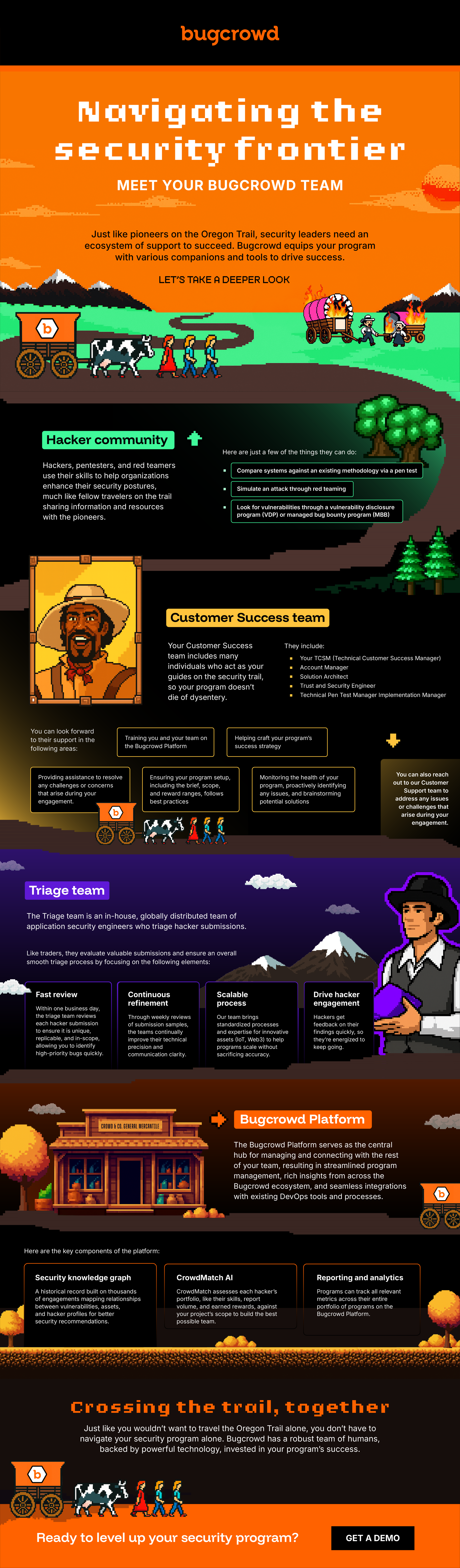
We faced this exact scenario when working with Bugcrowd on an infographic that explained all the teams that support a Bugcrowd engagement. Our idea? Use the Oregon Trail video game, a popular game from the 90s/early 2000s, in which the player must successfully guide a party of settlers across the Oregon Trail in the 19th century. "We're really proud of how this infographic turned out,” explained Erica Azad, Director of Content Marketing at Bugcrowd. “It’s a really creative idea, and allows us to highlight our differentiators.”
Link to the full infographic (it's also inline at the bottom)
In this blog post, I’ll share what I’ve learned about developing successful infographics where content takes the lead, using our work with Bugcrowd’s Oregon Trail infographic (pictured on the left) as a case study.
Lesson 1: Start with a concept
A concept is a metaphor or theme that connects the content and visuals. It helps drive consistency and engagement—the copy and visuals work together to communicate your message, increasing the likelihood that audiences get it. Note that a concept isn’t necessary to create an infographic; sometimes, it’s easier to jump straight into illustrating the key points. However, if you’re using an infographic to tell an important story or drive engagement, a concept can help convey the visual story more easily.
For example, suppose you’re creating an infographic about strategies for data quality management, and the takeaway is that data quality requires continuous monitoring and refinement. You could use a concept like tending a garden to illustrate how growth requires constant maintenance, or an athlete’s training cycle to highlight the importance of ongoing refinement.
But how do you come up with a great concept?
Lesson 2: Quality concepts mean starting with quantity
The secret to a good concept? Persistence. You need to churn out your bad ideas before you can get to a good one. AI can be a great partner for this work; it's fast at generating obvious ideas that can, in turn, spark newer, more creative ones.
When brainstorming, a good place to start is the goal behind the message, including the feeling you want it to evoke. For this infographic, the goal was to highlight Bugcrowd's core competitive advantage: unlike other platforms, their team is with you every step of the way. That's not just a nice-to-have. Getting security wrong has real consequences, so knowing your vendor has your back genuinely matters. The feeling the team wanted to capture was something like the bar in Cheers—a place where everybody knows your name.
I started by using AI to brainstorm ideas, but the ideas were derivative (like running an Italian restaurant) and didn’t feel very Bugcrowd: a playful, creative brand that values out-of-the-box ideas. So I did what every writer does when they want to give up: I went for a walk, letting my subconscious mull the problem, when, lo and behold, I thought of the Oregon Trail video game. Not only did this idea convey the “family” metaphor and the “security is a journey” messages, but it also had a retro feel to it that plays really well with the cybersecurity community.

We were only able to get here because we gave space for all the ideas—no matter how good or bad—and then kept pushing ourselves to come up with more.
Lesson 3: Keep the copy as succinct as possible
Infographics are meant to be skimmable, so the copy needs to be as tight as possible. Here’s how to think about what to include:
- Introduction: In 1–2 sentences, you should establish the purpose of the infographic and connect it to the concept. Don’t treat it like a blog post and spend 2–3 paragraphs setting up the problem; infographic intros need to be more to the point.
- Body: Focus on the most important details the audience needs to know to get the message, rather than providing a comprehensive overview. In fact, if you’re sacrificing a really great detail, explanation, or analogy—that’s success, not failure.
- Conclusion: Like the intro, keep it to 1–2 sentences to set up and link your CTA. Skip recapping the takeaways.
Being concise sounds easy in theory, but it’s much harder in practice. Take this section, where we needed to introduce all the teams that support a Bugcrowd client:
"Your customer success team includes many individuals who act as your guide on the security trail. They include your Technical Customer Success Manager (TCSM), Account Manager, Solution Architect, Trust and Security Engineer, Technical Pentest Manager, and Implementation Manager. You can also reach out to our Customer Support team to address any issues or challenges that arise during your engagement."
We could have gone deeper, explaining what each of these roles actually does to add more context. But the real goal of this section was simpler: communicate that Bugcrowd clients are extensively supported, from platform guidance to program monitoring, while giving the teams the credit they deserve. So instead of unpacking every title, we named the teams and zoomed out to highlight the value they collectively provide.

Lesson 4: Pepper in design notes to build alignment
To help the design team understand the overall vision (or any ideas you might have for illustrating specific sections), it’s helpful to leave design notes throughout the final document. We usually include one note at the top that describes the overall concept (along with links to any references for layout/aesthetics), and then add notes throughout the copy, which give the design team a starting point.
For many writers, figuring out the infographic's overall visual aesthetic is a tough ask, as we can struggle to think visually (hey, we’re writers for a reason). One useful tip: look up examples that can serve as references so you can easily show your thinking. Google Images is a great place to start, but we also recommend Behance, Dribbble, and Pinterest for more inspiration. Here’s an example of how I included a reference to describe what I was envisioning, including notes of what I’d want to change:

As you’re writing the design notes for each section, here are some things to think about:
- What do you want to emphasize in the section (statistic, specific keywords, etc.)?
- Do you have specific ideas for illustrations or visuals for this section?
- Are there any visual elements that should be avoided or that might confuse the target audience?
Here are a few examples of design notes from the Oregon Trail infographic that address the questions above:

![[For the introduction, we can show a group of pioneers (i.e., the security organization) trying to cross the Oregon Trail, but there are many obstacles in their way: disease, storms, and a rickety wagon]](/_next/image?url=https%3A%2F%2Fcdn.sanity.io%2Fimages%2Fht9pfihn%2Fproduction%2Fb88053aa9229aa7c8d19e3032d49dd545c5d0057-634x94.jpg%3Fw%3D800&w=1920&q=75)
___
Infographics are tricky. Not only do you have to pick the best words and arguments, but you also have to strategically layer visuals to create a delightful experience. Doing so successfully requires choosing a strong concept, keeping the copy as concise as possible, and using design notes to align with designers as you go.
For me, creating these infographics has been a great way to play with my writing—using my imagination to connect two ideas that shouldn’t work but do. When it works, it's memorable in the best way possible. When it doesn't, well... you've died of dysentery.

About Vinamrata Singal
Former Google APM and head of product, now technical writer by day and filmmaker by night. Fun fact: She grew up across three continents!